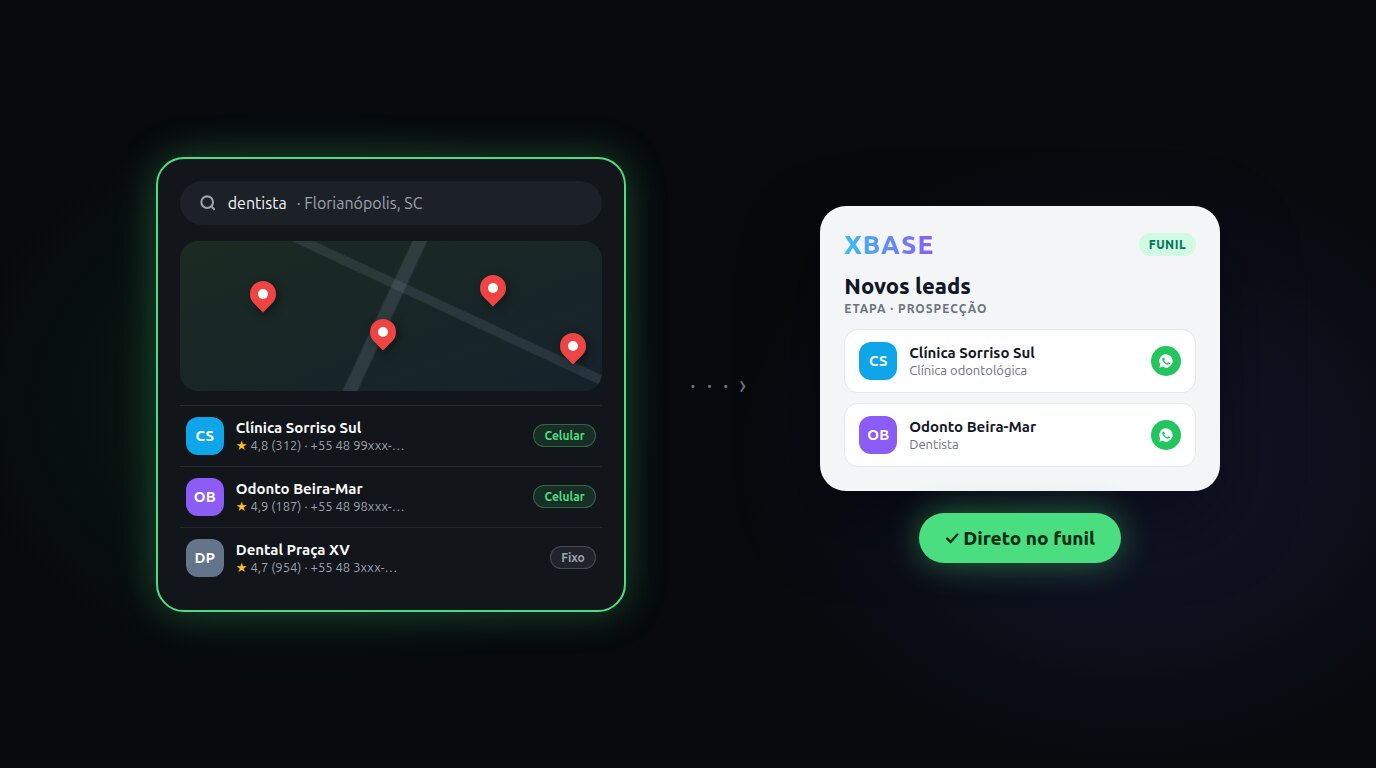
Find customers on Google Maps and send them straight to your funnel
Anyone who sells to businesses knows the routine: open Google Maps, search for "dentist in Miami", open each listing, copy the name and phone number into a spreadsheet and then add them to the CRM one by one. A whole afternoon to build a list of 30 businesses, and half of the numbers are landlines, with no WhatsApp.
Now XBASE Prospecting does that work for you: you enter the topic and the city, it brings in the businesses from Google Maps with phone, website, Instagram and rating, keeps the ones with a mobile number and sends the leads you pick straight to a funnel stage.
The search runs on treg.to, an external service that charges each search to the balance of your treg account. XBASE charges nothing extra for Prospecting. A quick search of 20 businesses, with a single topic, costs about US$0.003.
What changes day to day
- The list is ready in seconds. Topic, city and quantity: XBASE searches Google Maps and shows each business with phone, website, Instagram, rating and number of reviews.
- Only people you can reach on WhatsApp. The WhatsApp / mobile only filter separates mobile numbers from landlines and keeps only the ones with a mobile number.
- No duplicate contacts. Anyone who is already a contact in your workspace shows up with the Already in CRM badge and, if you want, stays off the list.
- You review before sending. Filter by neighborhood, sort by rating or number of reviews, drop the ones you don't want and export the list to Excel or CSV if you need it.
- From Maps to the funnel in one click. Choose the funnel and the stage: each business becomes a contact and enters the stage, ready for the automation or the agent that already handles that stage.
How it works in four steps
- In the menu, open Contacts and click Prospecting (or, in the contact list, Find new leads). The first time, connect your treg.to account with its token.
- In What are you looking for?, type the topic as you would on Google Maps — for example, "dentist". In Where?, the city. Choose the quantity and click Search businesses.
- Review the list: keep the businesses you're interested in selected.
- Click Send to funnel, choose the Funnel and the Stage. Done: the leads are in the funnel.
Prospecting doesn't send messages to anyone. It only puts the leads in the funnel; outreach stays with whoever already handles that stage, the way you set it up.
How much it costs
The cost depends on the type of search, and the screen shows which one will run before you click:
| Search | When | Approximate cost on treg.to |
|---|---|---|
| Quick | one topic and up to 20 businesses | about US$0.003 per search |
| Wide | more than one topic or more than 20 businesses | about US$0.009 per business |
The wide search visits each business's website to bring in emails and social profiles, which is why it costs more. To spend less, search one topic at a time. Your treg account balance shows at the top of Prospecting, updated after each search.
What you need
- A treg.to account with balance, and its token. According to treg.to, a new verified account gets US$1.00 of credit once.
- A funnel in your workspace, with the stage that will receive the leads.
The full step-by-step is in the tutorial How to find customers on Google Maps and send them to your funnel, and the rules (what happens to each lead, filters and limits) are in the documentation Lead prospecting on Google Maps.
Sources
- treg.to — API and gateway documentation: treg.to/docs
- treg.to — endpoint catalog and pricing: treg.to/catalog
- treg.to — usage guide for agents (billing and initial credit): treg.to/skill.md
Keep reading
From script to Reels ad without leaving XBASE
Create the Reels in the Studio in 6 steps, already in the format Meta recommends for ads (9:16, with sound and text in the safe zone), and take the piece to the ad set with the WhatsApp button.
Read articleYour meeting summaries and transcripts, right in the customer history
Record the meeting with Tactiq and bring the summary and transcript into the XBASE Calendar, next to the contact and the pipeline. Works with a paid Tactiq plan.
Read article