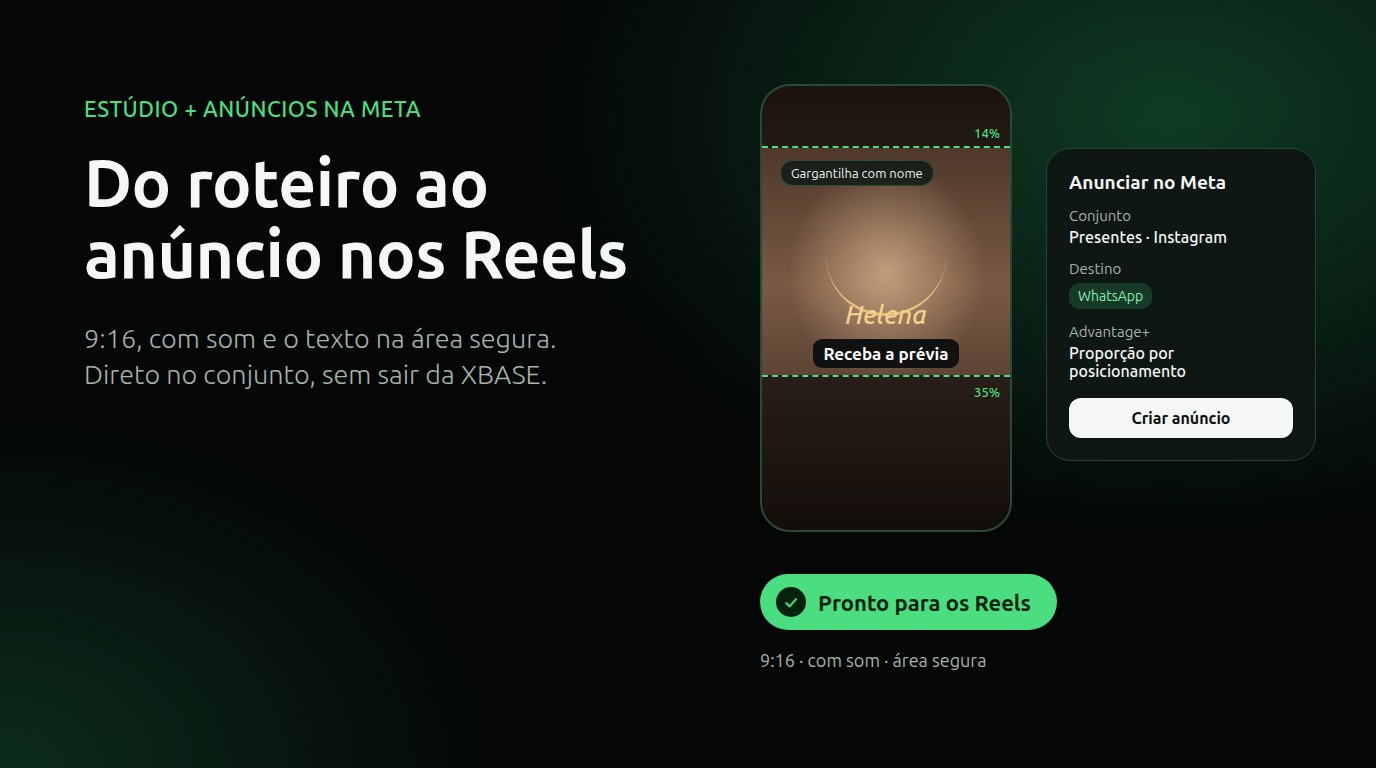
From script to Reels ad without leaving XBASE
Reels have become the place where many stores find new customers. For advertisers, though, the road there has too many steps: writing the script, producing the video, exporting it, uploading it to Ads Manager, building the creative, choosing the WhatsApp button and hoping the most important line doesn't end up hidden behind the on-screen buttons.
XBASE brought that road together. The Studio creates the Reels already in the format Meta recommends for ads, and the Advertise on Meta panel takes the piece straight to an ad set in your account, with the button to WhatsApp.
What Meta recommends for Reels ads
Meta's official guide to Reels ads and the Ads Guide specifications point the same way:
- Vertical 9:16 video, with sound. Reels play with sound by default.
- Key messages in the safe zone. The interface covers part of the screen: the profile and the sound icon sit at the top; the name, the caption and the ad button sit at the bottom. The recommendation is to keep about 14% at the top, 35% at the bottom and 6% on each side free of text and logos.
- Advantage+ creative. Meta can adjust the aspect ratio for each placement, expand an image to 9:16 with AI and add music from its library to an image ad.
And the numbers Meta itself publishes: campaigns with 9:16 video, audio and messages in the safe zone got 2 times more delivery in the Reels placement and a 34.5% lower cost per result than image ads, in a meta-analysis of 15 A/B tests. The same page features advertisers who combined Reels with click-to-message ads on WhatsApp or Messenger.
Why it hits your wallet
Each point above is a way to lose money without noticing:
- the offer written at the bottom of the video ends up behind the Send message button;
- a video without narration says nothing to people who have the sound on;
- the product only shows up at second 20, when the person has already moved on to the next Reels;
- the primary text starts with what doesn't matter, and the essential part ends up after "see more".
The ad runs, spends the budget and delivers less than it could.
How it works in XBASE
1. Create the piece in 6 steps
In Production → Studio → Create, you choose one thing per step: Format (Reels, carousel or image, in the feed or in Stories), Template (animation, split screen, presenter), Editorial line and persona, Channels, Content (opening hook term, brief and up to 4 product photos) and Review and generate. With the product photos, the AI creates the scene and the product appears as it does in the photo, without inventing details; even so, check its accuracy before advertising.
2. Reels in the ad standard
When you check Meta ad under Channels, the Studio:
- writes the script with the hook and the product in the first 3 seconds, on screen and in the voiceover, and starts the caption with the essential part (it becomes the ad's primary text);
- builds the word-by-word captions and places the text above the bottom 35% and away from the edges;
- checks everything at the end, in the Ready for Reels block: vertical 9:16, with sound and with the text in the safe zone.
3. Advertise on Meta
Once the production is ready, the Advertise on Meta panel creates the ad in an ad set that already exists in your account:
- choose the Ad set (the ad uses its audience and budget);
- check the Primary text and the Headline, which already come from the script;
- choose the destination: WhatsApp, with the message already written, or a website with the button you prefer;
- check the Advantage+ features you want (whatever is left unchecked stays off);
- create it: the ad starts paused, unless you check Turn on now.
Every creation asks for confirmation and is logged in Ads → Notices. If you use an AI agent through the XBASE MCP, it can leave the ad ready as a draft, and someone on the team approves it.
What it doesn't do yet
- Carousels are still built in Ads Manager.
- Partnership ads with creators and using an already published post aren't in the panel yet.
- It doesn't replace your eye. Look at the frame sheet and at the product in the piece before turning it on.
- Meta reviews every new ad. With Turn on now, it starts running after Meta approves it.
- Costs: media is paid in your Meta account, and AI voice, images and video are charged by the provider of the key used in the Studio.
Frequently asked questions
Do I still need Ads Manager? To create the campaign and the ad set (audience and budget), yes, once. After that, each new Reels goes into the ad set from the Studio.
Does it work with click-to-WhatsApp ads? Yes, in ad sets with WhatsApp as the destination. The pre-written message comes from the script and you can edit it before creating the ad.
Does the ad start spending right away? No. It starts paused. Only with Turn on now does it go to Meta's review and, once approved, use the ad set's budget.
For the step-by-step guide, read the tutorial How to create a Reels in the Studio and the Creative Studio documentation, with the Advertise on Meta section.
Sources
- Meta for Business, "Facebook and Instagram Reels ads" (facebook.com/business/ads/facebook-instagram-reels-ads).
- Meta Ads Guide, ad specifications for Instagram Reels and Facebook Reels (facebook.com/business/ads-guide).
Keep reading
Find customers on Google Maps and send them straight to your funnel
Enter a topic and a city: XBASE Prospecting brings in businesses from Google Maps with phone, website and rating, keeps the ones with a mobile number and sends the leads you pick to a funnel stage.
Read articleYour meeting summaries and transcripts, right in the customer history
Record the meeting with Tactiq and bring the summary and transcript into the XBASE Calendar, next to the contact and the pipeline. Works with a paid Tactiq plan.
Read article